Showing posts with label couch to 5K. Show all posts

Monday, June 11, 2012

Cupcakes and Running Nude with a Potty-Mouth


I love the quote that says, "If you are tired of starting over, stop quitting."
Can I get a T-shirt design, please?
And yet I struggle with this on a daily basis.
One of my biggest faults is over-commitment and under-follow-through.
It's a curse, really.
(and I'm pretty sure a tad genetic.)
One thing I'm not going to do is lie to you and tell you that I ran last week.
At all. . . not One. Single. Time.
It's pathetic.
I did so well during week one and two and didn't miss a single run.
Then I totally drop the ball on Week Three.
Gah.
It's not like I didn't have a ton on my plate:
Potty-training my three-year-old is proving to be harder
than nailing jello to a tree.
We're making 20-minute sprints to the bathroom, underwear flying
Only to have pee and poo splattered all over my tile floors,
and tiny baby bottoms. . . and my hair.  
(Don't even ASK me how that happened.
 It was a seventh world wonder experience, I assure you. )
While we're talking about WONDERS, 
I'd like to use this platform to point out that part of my sleepless nights
have been spent cheering my THUNDER team to greatness
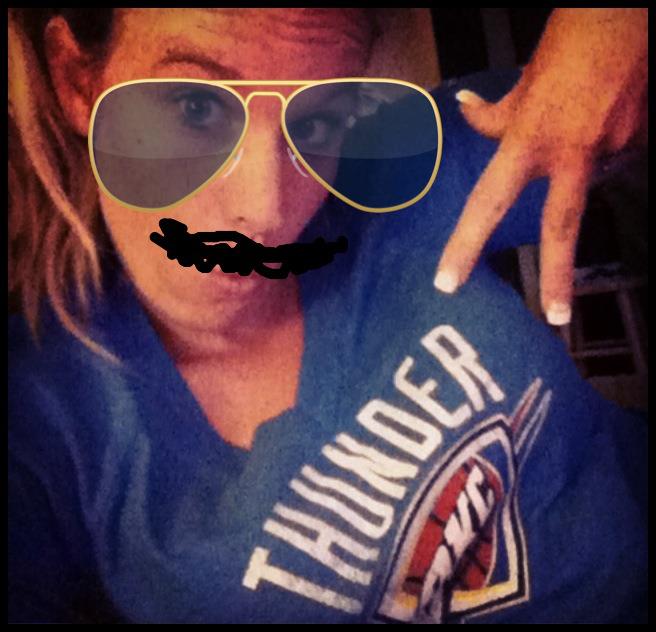
Western Conference Champions, baby!! 
Also. . . 
One of my bestie's is having a baby, so I've also been staying up
til ungodly hours of the night making baby blankets
and scrapbooks and teeny-tiny-baby-bikini onesies.
Going to bed at three when you're supposed to be up to run at six
does not, I repeat NOT a cheerful mommy (with motivation to boot!) make.
And just to add nonsense to my already chaotic excuse,
I had nothing to wear.
No really. . .I hadn't done laundry in three weeks.
I'm not so sure running nude through my neighborhood is even allowed.
So I quit.  Just this week.
And hated myself for it. 
So many of you were very encouraging.
Telling me to pick myself up and start over.
That's the reason I decided to do this little blog.
The accountability is just what I needed.
If you haven't joined any of our conversations, you can do that here:
I'd love your support and inspiration in doing just that. . . 
Starting over.
Here I go, Week Three!
Alarm clock, get ready for a pounding!
I'm going to give it my all this week. 
I'm going to Run, Run, Run my little heart out!
In a sports bra and shorts cause laundry is done and the nudist lifestyle is not longer necessary.
You're welcome.
And on an equally serious note, 
We're all going to go pee and poo in the potty this week.
(This is my wishful thinking, although I can assure you that I will go in the big girl potty.)
All systems are officially a go for a Do-Over Week Three.
There is only 5 weeks left before my 5K race.
Heaven help me!
Send me your prayers and your well-wishes, friends!
(and cupcakes, if you've got em.)

Wednesday, May 23, 2012

Running With Technology

Slightly obsessed with tracking your workouts? Grab your iPhone and discover the wonderful world of free running apps. The built-in GPS allows you to track your run no matter where you are: on trails, busy neighborhoods, or dirt roads. Whether you want an actual Google Map of your route, a calendar showing off the days you worked out, or to share your workouts with your pals on Facebook or Twitter — there's an app for that. If you're new to the running app scene, here are six free iPhone apps you'll want to check out! 


NIKE + GPS


It maps out your run using the built-in GPS (no sensor required), so no matter where you go, it can keep track of your pace, distance, calories burned, and map out the route you've completed. I like that the display is easy to read — I can quickly glance down and know how many calories I've burned, or tap the screen to see a map of how far I've gone. There are three workout settings to choose from: Basic (run with no set time or distance), Time (run against the clock), or Distance (run a certain mileage). This app is compatible with your iTunes library, so it's easy to choose a playlist before you begin your workout, and if you want to skip a song, just tap the arrows on the main screen.


iMapMyRun

If you've used the MapMyRun website before, you'll be happy to know they have a free app for your phone. iMapMyRUN can sync with your MapMyRun online account, so you can automatically upload your workout info. During your run, it records your time, speed, distance, and it can even keep track of your heart rate (as long as you use a compatible heart rate monitor). The stats are in a large font so you can quickly keep track of your progress. If you tap "Map," you can actually watch yourself (a little blue dot) travel along the road map, so it's great if you're running in a new area. I love that the map also has mile markers along the route so when you need a little visual inspiration you can look down and see you only have a few more blocks till you hit three miles.

LogYourRun Free

The LogYourRun Free app utilizes the built-in GPS and accelerometer to map your time, distance, and pace. The main screen is easy to read, and if you swipe to the right, you can see a map of your route, and if you swipe it again, you get info on your heart rate (you must have a separately purchased compatible heart rate monitor).

You can choose your own route or if you need a little nudge, download the free training programs such as Couch to 5K or Your First Marathon. One very convenient feature is that if you like listening to music, you can access your iTunes library playlists, all with a tap of the music button in the upper left corner. My favorite feature is the use of Google maps to see your running route. If you're bored with your usual neighborhood loop, it points out routes other users have mapped out near you.

 5K Free
Most people have heard of the Couch to 5K running program, and here is the app that goes along with it. I'll be upfront and tell you that the free version of the 5K Runner only includes the first two weeks of the eight-week training program, so if you want the complete program, you'll need to fork over $3 for thefull version. It's nice that there is a free version you can test out, and if you love it, you can always upgrade.

This app will gradually guide you through the first two weeks of the eight-week program, mapping out three workouts per week. I love that an audio coach tells you exactly what to do per workout (warm up, walk, run, or cool down) and there's a colorful little chart you can use to follow along. The walking/running intervals increase in intensity over the eight-week program, so this app is perfect for beginners.

If you're a fan of working out to music, you can listen to your iTunes playlists in the background, but you might find it annoying that you have to double tap the Home button, then tap iTunes every time you want to skip a song. I do love that this app keeps track of each workout and charts your progress, and like most of these running apps, you can share your workouts with the Twitter or Facebook world.

Running Log Free

If you like to keep your running data all in one place, you'll love this handy app, Running Log Free. It's purely for recording the duration, distance, pace, and other details of your workouts. Just tap the calender day, fill in the info, and you're set. I love that you can look at each month and visually see how many days you've worked out. Plus it tallies your total distance, exercise time, average pace, and rest days, so you can easily see if you've reached your monthly goal.

Just to be clear, this app will not chart your time, distance, pace, and calories burned while working out. This is just an app to help you log all the data you've already collected from another source, whether it be an app like the Nike+ GPS, your treadmill readout, or your GPS watch. This app has definitely motivated me to keep up with my workouts, because it's fun filling in the days on the calendar and seeing all the red squares (runs) staring back at me. If you tend to run more than once a day, you'll want to upgrade to the full version($1).

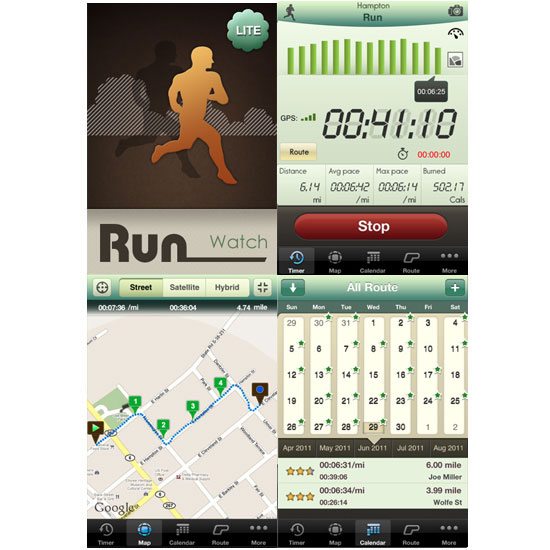
Run-Watch Lite

This app has the whole shebang in one place. Run Watch Lite uses your iPhone's built-in GPS to track your run, including the route (shown on a map), distance, pace, time, calories burned, and it even shows your elevation.
The display is clear and easy to read, and I love that the map can be viewed by streets, by satellite (with actual photos of the aerial view of your route), or a hybrid of both. While you move, you can see the little blue trail you make on the map, which not only shows your progress, but also prevents you from getting lost.

Another unique feature is the camera icon in the upper right corner. Just tap it and take a photo while on your run. After your run is completed, if you tap "Route" on the bottom, you can get all the stats for your workout including time, distance, speed, calories burned, and it also shows you a drawing of your route and the photos you've taken. If you're into Twitter and Facebook, you can have your workouts auto-posted. Your run is also charted on the monthly calendar, and after several workouts, all those little green stars are a motivational little pat on the back.

The one downfall to this app is that although you can listen to iTunes in the background, you have to toggle between the two apps in order to adjust your music.


**The majority of this information I received through a very helpful website called FitSugar.com.  Check it out for lots more advice on how to take your running to the next level!

Do you have an app that works best for you? I'd love to hear some reviews!

Monday, May 21, 2012

On Your Mark. . .Get Set. . .RUN!!


Before I get started on how my first run went, 
let's take care of some less appetizing business. . .

So here's the real deal-y.  I plan to post pictures
 (as I've threatened previously)
of the month-to-month progress. 
I'll post these photos on the 20th of every month. 

Photos will likely be enough to give all you "child-less" amigas 
enough birth-control to last years to come. Go on and get those chastity belts ready! 
Kids did NOT do this body good! 
I'm a bit embarrassed to post them at all, so please, if you leave comments,
they had better be of the "you don't at all look like a beached whale!" nature
or I may start running in a full-on hajib for the duration of my training. 
What a sec. . .that may not be a bad idea. . ..I'd definitely "glisten" more. . .
I could certainly be onto something here.
Anywho. . .pictures. . .Lordy, the before pictures. . .
Without further ado
 (unless of course, you have some -ado, then by all means, 
don't let my rushing around to show you half-naked pics of my
 flabby booty get in the way. . .)
Here's the horror and reality of my situation: 
Shock and awe, right?!
I know, I hide it well!  At least that's what I tell myself!

Now I know it's not nearly as bad as some other's situation.
But it's still a "situation" to me.
One that I'm asking God to help me overcome, starting right now.

And now for DAY ONE:
I won't be posting about every single one,
 so please don't get scared off just yet.
But today was a milestone. 
It seems that day one is always the most difficult
for any new project or exercise regime.
Mine was a doozy.
You see in Oklahoma, I woke up to this today:
Not exactly the first morning run I had envisioned. . .
I don't even own a pancho.
Stupendous.
But I strapped on the sneakers and set out.
And I found in the process of my belly-aching about perfect running conditions
 that I quite like running in the rain!  Who knew!  
It's like one giant sprinkler follows you around as you burn calories! 
So from now on, on days I have a longer run
you might find me washing my car the night before. 
We all know that will bring the Oklahoma showers!
The run itself was marvelous. 
60 seconds of jogging then 90 seconds of walking.
Repeating that for 20 minutes. 
I got tired of counting in my head instead of enjoying the music in my ipod
so I started a new method. . .
walk during the verses of songs, run during the choruses.
It did the trick nicely.
Day One down and I'm still excited about this project.

Now I need a nap.
Happy running fellow couch potatoes!